
Last updated: Nov 18, 2026
Binary Calculator
Binary Calculator: Add, Subtract, Multiply & Divide Binary Numbers (With Steps)
A binary calculator does math on numbers made only of 0s and 1s. Enter two binary values, pick an operation, and the tool shows the answer in binary, decimal, hex and octal.
This free binary calculator has 12 cards. They cover add, subtract, multiply, divide, modulo, AND, OR, XOR, shifts, two’s complement, overflow, binary fractions, ASCII, Hamming codes and IPv4 masks. Every card runs on its own, and each checks its answer against decimal.
It suits students learning base 2, programmers working with bit masks, and networking and electronics learners. Anyone who wants a binary math calculator that shows its work can use it too.
Binary matters because every computer stores data as bits. One wrong carry, one wrong bit width or one lost sign bit changes the whole answer.
Quick facts
- Input rules: Digits must be 0 or 1. You may type a
0bprefix, spaces, commas or underscores. - Bases: Cards that accept a base support bases 2 to 36.
- Output: Binary, decimal, hex and octal, with a decimal cross-check.
- Bit widths: Signed and unsigned results work from 1 to 1,024 bits, depending on the card.
How to Use the Binary Calculator
You can use any card in under a minute.
- Choose a card. Card 1 covers everyday binary arithmetic. Later cards handle bitwise logic, signed numbers and more.
- Type your values. Fields default to base 2. Change the base menu to enter decimal, hex or any base up to 36.
- Pick an operation and a bit width. Leave the width on “Auto” when you only want the exact answer.
- Click Calculate. Click Fill Example to load sample numbers. Click Reset to clear the card.
- Read the results. Compare the binary answer with the decimal cross-check. They must match.
- Chain the cards. A result fills the next card and is marked “Auto-filled.” Type your own value to override it.
If you see an “Invalid digit” message, a character is not allowed in that base. In base 2, the digits 2 to 9 are errors.
What Each of the 12 Cards Does
| # | Card | Inputs | Main results |
|---|---|---|---|
| 1 | Binary Arithmetic | Value A, Base of A, Value B, Base of B, Operation, Output base | Binary result, chosen base, decimal cross-check, hex/octal, bit count, parity |
| 2 | Bitwise Logic Lab | Binary A, Binary B, Bit width, Operation | Result at set width, Hamming distance, Jaccard similarity, shared set bits |
| 3 | Two’s Complement | Value, Base, Bit width | Stored pattern, signed/unsigned reading, one’s complement, signed range |
| 4 | Number Base Converter | Number, From base, To base, Group size | Binary, octal, decimal, hex, bits and bytes |
| 5 | Bit Shift and Rotate | Binary value, Width, Shift amount, Operation | Result, bits shifted out, equivalent math, overflow flag |
| 6 | Bit Width and Overflow | Value A, Value B, Base, Operation, Width, Signed or unsigned | Exact result, wrapped result, valid range, headroom |
| 7 | Binary Long Division | Dividend, Divisor, Fraction bits | Quotient, remainder, divisibility, division steps |
| 8 | Binary Fractions and IEEE-754 | Value, Direction, Max fraction bits | Decimal/binary/hex value, approximation error, float32 encoding |
| 9 | Binary to Text and ASCII | Text or binary, Direction, Bits per byte, Separator | Hex bytes, decimal codes, total bits, parity |
| 10 | Hamming Code | Data bits, Parity type, Flip position | Parity bits, overhead, received word, syndrome |
| 11 | IPv4 and CIDR Mask | IPv4 address, Prefix length | Binary address, mask, network/broadcast, usable hosts |
| 12 | Number Properties and Gray Code | Value, Base, Bit width, Gray bits | Population count, leading/trailing zeros, power-of-two test, Gray code |
Formulas the calculator uses
- Arithmetic: Result = A op B, computed with arbitrary-precision integers. That is why large binary numbers do not lose digits.
- Place value: Value = sum of (digit × base^position).
- Two’s complement: Stored pattern = value mod 2^N. Signed range = −2^(N−1) to 2^(N−1) − 1.
- Shifts: Left shift by n multiplies by 2^n. Logical right shift divides by 2^n and rounds down.
- Division: For each bit, remainder = 2 × remainder + bit. Then dividend = quotient × divisor + remainder.
- Gray code: n XOR (n >> 1).
- IPv4: Network = IP AND mask. Usable hosts = 2^(32 − prefix) − 2.
Assumptions and limits
- Card 1 integer division drops the remainder. Use Card 7 when you need the remainder or fraction bits.
- Card 1 accepts powers with exponents from 0 to 2000. Division and modulo by zero return an error.
- Card 2 accepts only non-negative inputs. Use Card 3 for signed values.
- Card 10 accepts 1 to 57 data bits and corrects a single flipped bit.
- Card 8 rounds to the bits you allow, so many decimals show an approximation error.
- The calculator code runs in your browser and makes no network requests with your numbers. Like most sites, intelcalculator.com may use ads and analytics. See the privacy policy.
- Use results for learning and checking. For safety-critical hardware or code, confirm them in your own toolchain.
What to Look for in a Binary Calculator
If you are comparing the best binary calculator options, five features separate a toy from a real tool.
| Feature | Why it matters | In this tool |
|---|---|---|
| Full operation set | Learners and coders both need more than add and subtract | Yes: + − × ÷, mod, power, AND, OR, XOR, shifts |
| Bit width and signed mode | Without them, negatives and overflow are wrong | Yes: Cards 3, 5, 6 |
| Remainders | Division rarely comes out even | Yes: Card 7 |
| Steps and checks | You learn only if you see the work | Partly: division steps, bit matrix, decimal check |
| Large numbers | Programmers use 64-bit and wider values | Yes: arbitrary precision |
Binary Place Values and Conversion
Binary is base 2. Each position is worth twice the position to its right. The base is also called the radix.
| Position | 7 | 6 | 5 | 4 | 3 | 2 | 1 | 0 |
|---|---|---|---|---|---|---|---|---|
| Value | 128 | 64 | 32 | 16 | 8 | 4 | 2 | 1 |
To read 101101, add the place values where a 1 appears: 32 + 8 + 4 + 1 = 45. To go the other way, subtract the biggest power of two that fits, then repeat.
You can do both steps in Card 4, our number base converter. For practice numbers, use the random number generator.
Reference table: 0 to 31
| Dec | Bin | Hex | Dec | Bin | Hex |
|---|---|---|---|---|---|
| 0 | 00000 | 0 | 16 | 10000 | 10 |
| 1 | 00001 | 1 | 17 | 10001 | 11 |
| 2 | 00010 | 2 | 18 | 10010 | 12 |
| 3 | 00011 | 3 | 19 | 10011 | 13 |
| 4 | 00100 | 4 | 20 | 10100 | 14 |
| 5 | 00101 | 5 | 21 | 10101 | 15 |
| 6 | 00110 | 6 | 22 | 10110 | 16 |
| 7 | 00111 | 7 | 23 | 10111 | 17 |
| 8 | 01000 | 8 | 24 | 11000 | 18 |
| 9 | 01001 | 9 | 25 | 11001 | 19 |
| 10 | 01010 | A | 26 | 11010 | 1A |
| 11 | 01011 | B | 27 | 11011 | 1B |
| 12 | 01100 | C | 28 | 11100 | 1C |
| 13 | 01101 | D | 29 | 11101 | 1D |
| 14 | 01110 | E | 30 | 11110 | 1E |
| 15 | 01111 | F | 31 | 11111 | 1F |
Binary, octal, decimal and hex compared
Hex and octal exist because they are short ways to write long bit strings. One hex digit equals four bits, called a nibble. One octal digit equals three bits.
| System | Base | Digits | Bits per digit | 45 written as | Typical use |
|---|---|---|---|---|---|
| Binary | 2 | 0–1 | 1 | 101101 | Hardware, logic |
| Octal | 8 | 0–7 | 3 | 55 | Unix file permissions |
| Decimal | 10 | 0–9 | n/a | 45 | Everyday math |
| Hexadecimal | 16 | 0–9, A–F | 4 | 2D | Memory, colors, debugging |
German mathematician Gottfried Leibniz described modern binary arithmetic in 1703. Computers adopted it because two states, on and off, are easy to build reliably.
Binary Addition
Binary addition follows five rules. This is the core of any binary addition calculator.
| Sum | Result | Carry |
|---|---|---|
| 0 + 0 | 0 | 0 |
| 0 + 1 | 1 | 0 |
| 1 + 0 | 1 | 0 |
| 1 + 1 | 0 | 1 |
| 1 + 1 + 1 | 1 | 1 |
Example 1: 1011 + 1101
carry:   1 1 1 1
           1 0 1 1
       +   1 1 0 1
         ---------
         1 1 0 0 0
Work from the right. 1 + 1 = 10, so write 0 and carry 1. The carry keeps moving left until the final carry becomes the leading 1.
Decimal check:11 + 13 = 24, and 11000 = 16 + 8 = 24.
Example 2: 110101 + 100110 = 1011011. In decimal, 53 + 38 = 91, and 1011011 = 64 + 16 + 8 + 2 + 1 = 91. This is the default example in Card 1.
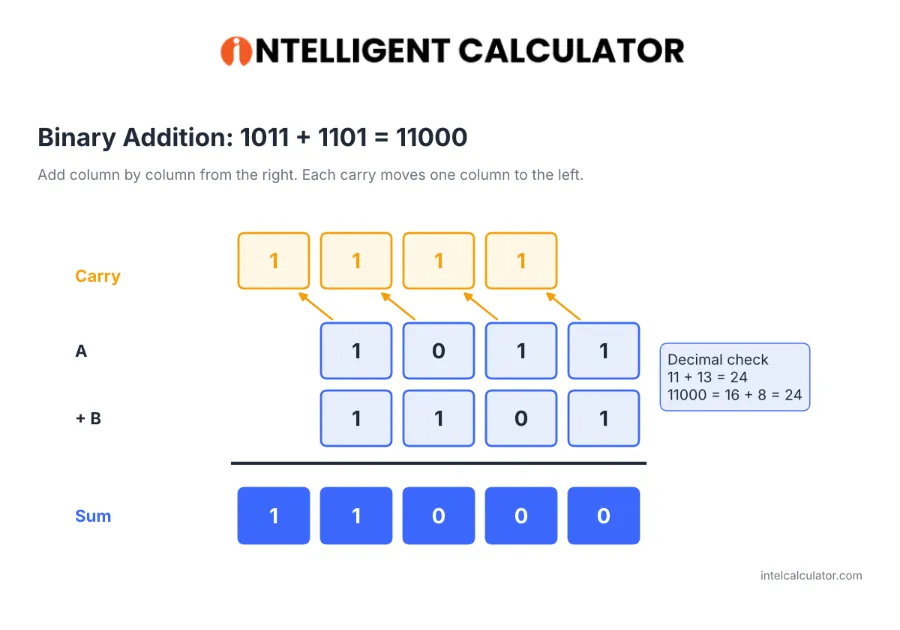
If you want to add binary numbers fast, line up the digits on the right. Then add one column at a time.
Binary Subtraction
Binary subtraction uses borrowing. If you subtract 1 from 0, borrow 1 from the next column to the left. That borrowed 1 is worth 2, so 10 − 1 = 1.
Example 1: 11010 − 1011 = 1111. In decimal, 26 − 11 = 15. A binary subtraction calculator should confirm 1111 = 15.
Example 2: 101 − 1001 (a negative result). Subtract the smaller from the larger: 1001 − 101 = 100. Put a minus sign in front, so the answer is −100, or −4 in decimal.
Computers do not store a minus sign. In 8-bit two’s complement, −4 is stored as 11111100. We cover this method in the next sections.
Binary Multiplication
Multiplying binary numbers is simpler than decimal. Each digit of the second number is either 0 or 1, so each partial product is either zero or a copy of the first number.
Example 1: 1101 × 101
- The rightmost 1 gives 1101.
- The middle 0 gives 0000.
- The left 1 gives 1101 shifted two places, which is 110100.
- Add them: 1101 + 110100 = 1000001.
Decimal check: 13 × 5 = 65, and 1000001 = 64 + 1 = 65.
Example 2: 110 × 11 = 10010. The partial products are 110 and 1100. They add to 10010, and 6 × 3 = 18.
Binary Division
Binary division works like long division. At each step you ask if the divisor fits into the running remainder. If it does, write 1 in the quotient and subtract. If not, write 0.
Example with a remainder: 110101 ÷ 101
- The quotient is 1010 (decimal 10).
- The remainder is 11 (decimal 3).
- Check: 1010 × 101 = 110010 (50), and 50 + 3 = 53 = 110101. ✔
The rule to remember is dividend = quotient × divisor + remainder.
You can also keep dividing past the binary point. With 4 fraction bits, 53 ÷ 5 becomes 1010.1001, which is 10.5625. The true value is 10.6, so the gap of 0.0375 is the approximation error.
Dividing by zero has no answer. The calculator shows “Cannot divide by zero.” Try the remainder calculator for decimal remainders, or the integer calculator for whole-number work.
Card 1 also offers modulo, power, greatest common divisor and least common multiple. See the GCF calculator and LCM calculator for the decimal versions.
Bitwise Operations: AND, OR, XOR, NOT and Shifts
Bitwise operations compare two numbers one bit at a time. Programmers use them for flags, masks and permissions. If you are looking for a bitwise calculator, Card 2 handles these operations.
| A | B | AND | OR | XOR | NAND | NOR | XNOR |
|---|---|---|---|---|---|---|---|
| 0 | 0 | 0 | 0 | 0 | 1 | 1 | 1 |
| 0 | 1 | 0 | 1 | 1 | 1 | 0 | 0 |
| 1 | 0 | 0 | 1 | 1 | 1 | 0 | 0 |
| 1 | 1 | 1 | 1 | 0 | 0 | 0 | 1 |
Example: A = 11110000, B = 10101010 at 8 bits
- AND = 10100000
- OR = 11111010
- XOR = 01011010
NOT flips every bit. At 8 bits, NOT 10101010 gives 01010101. Card 3 shows this as the one’s complement, and Card 2 gives the same result as XOR with all ones.
Left shift and right shift
A shift slides every bit sideways. This calculator works as a left shift right shift calculator through Card 5.
Example: 10110011 at 8 bits, shifted by 3
- Logical left shift (<<) gives 10011000. The bits 101 fall off the left end.
- Logical right shift (>>>), also called the zero-fill right shift, gives 00010110.
- Arithmetic right shift (>>) by 2 gives 11101100. It copies the sign bit, so −77 becomes −20.
Left shift by n multiplies by 2^n. Right shift divides by 2^n and rounds down. A rotate moves the lost bits to the other end instead of dropping them.
Negative Numbers and Two’s Complement
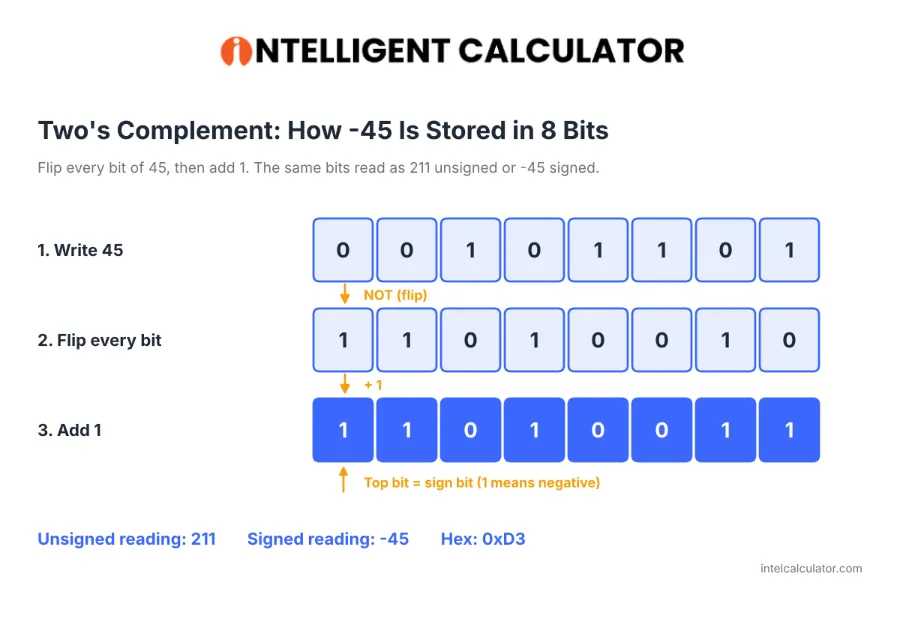
Computers store negative numbers with two’s complement. The top bit acts as the sign, and the same bits can mean different numbers.
How to find −45 in 8 bits
- Write 45 in binary: 00101101.
- Flip every bit: 11010010.
- Add 1: 11010011.
The result is 0xD3. Read as unsigned, those bits equal 211. Read as signed, they equal −45.
Signed vs unsigned
| Bits | Unsigned range | Signed range | Total values |
|---|---|---|---|
| 4 | 0 to 15 | −8 to 7 | 16 |
| 8 | 0 to 255 | −128 to 127 | 256 |
| 16 | 0 to 65,535 | −32,768 to 32,767 | 65,536 |
| 32 | 0 to 4,294,967,295 | −2,147,483,648 to 2,147,483,647 | 4,294,967,296 |
| 64 | 0 to 18,446,744,073,709,551,615 | −9,223,372,036,854,775,808 to 9,223,372,036,854,775,807 | 18,446,744,073,709,551,616 |
All values come from 2^N − 1 and −2^(N−1) to 2^(N−1) − 1. Our two’s complement calculator has a dedicated page for this method. Use the absolute value calculator when you only need a number’s size.
Pro tip: Always choose signed or unsigned before you read a result. The pattern 11111111 is 255 unsigned and −1 signed.
Binary Overflow and Wrap-Around
Binary overflow happens when the exact answer needs more bits than you have. The stored result wraps around, which is why this is also called n-bit wrap.
Two examples at 8 bits
- Unsigned: 200 + 100 = 300. The stored answer is 300 mod 256 = 44, or 00101100.
- Signed: 127 + 1 = 128. The stored answer is −128, or 10000000.
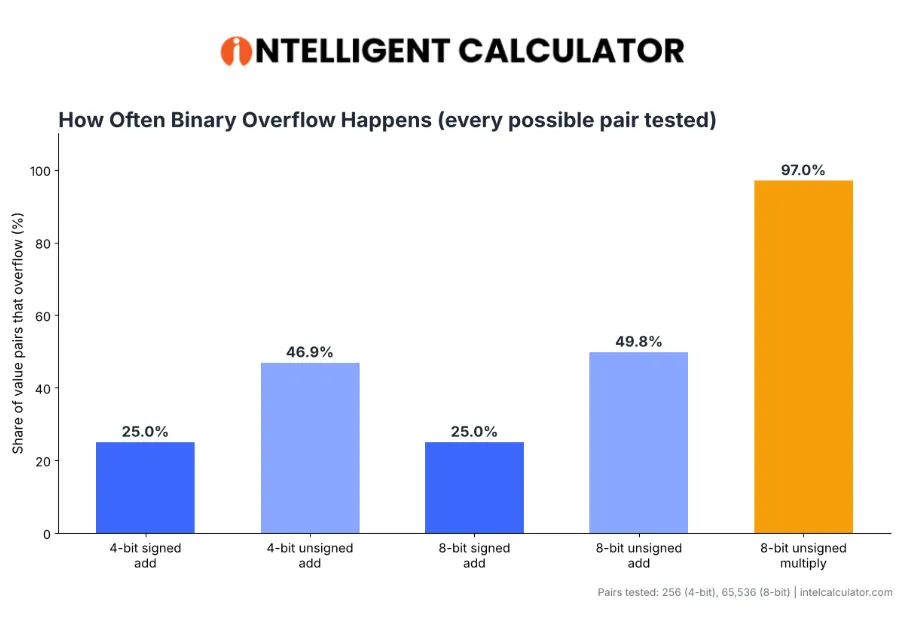
Card 6 shows the exact result, the wrapped result, the valid range and the headroom left. We ran a small experiment to see how common overflow is. We tested every possible pair of values at two sizes.
| Test | Pairs tested | Pairs that overflow | Share |
|---|---|---|---|
| 4-bit unsigned add | 256 | 120 | 46.9% |
| 4-bit signed add | 256 | 64 | 25.0% |
| 8-bit unsigned add | 65,536 | 32,640 | 49.8% |
| 8-bit signed add | 65,536 | 16,384 | 25.0% |
| 8-bit unsigned multiply | 65,536 | 63,568 | 97.0% |
Unsigned addition overflows for nearly half of all pairs. Signed addition overflows for exactly a quarter. Multiplication overflows far more often, because products grow quickly.
Overflow is a real engineering risk. The 1996 Ariane 5 Flight 501 failure traced to a 64-bit float converted into a 16-bit signed integer that was too small. Many systems that count seconds in a 32-bit signed integer reach their limit of 2,147,483,647 on January 19, 2038.
Binary Fractions and Floating Point
Fractions use weights of 1/2, 1/4, 1/8 and so on. For example, 1011.101 = 8 + 2 + 1 + 0.5 + 0.125 = 11.625.
Many decimals cannot be written exactly. Decimal 0.1 repeats forever in binary, starting 0.0001100110011. A 32-bit float stores it as 0x3DCCCCCD, which is about 0.10000000149.
Card 8 shows this approximation error and the IEEE 754 float32 encoding. For very large or small decimals, try the scientific notation calculator or the decimal calculator.
Real-World Uses of Binary Math
Text and ASCII. Each character becomes one or more bytes. “Hi!” is 01001000 01101001 00100001 in 8-bit form. ASCII uses 7 bits per character, and UTF-8 uses 8 bits or more. Plain ASCII was standardized in 1963.
IPv4 and subnets. A mask sets the first N bits to 1. For 192.168.10.37 with a /24 prefix, the mask is 255.255.255.0 and the network is 192.168.10.0. The broadcast address is 192.168.10.255, and there are 254 usable hosts. For 10.20.30.40 at /19, the network is 10.20.0.0 and there are 8,190 usable hosts. Use the kilobytes to megabytes converter for data-size questions.
Error correction. Richard Hamming described his codes in 1950. They add parity bits at positions 1, 2, 4, 8 and so on. The syndrome points to the flipped bit.
| Data bits | Parity bits | Codeword | Overhead |
|---|---|---|---|
| 4 | 3 | 7 | 42.9% |
| 8 | 4 | 12 | 33.3% |
| 11 | 4 | 15 | 26.7% |
| 26 | 5 | 31 | 16.1% |
| 57 | 6 | 63 | 9.5% |
Longer messages waste less space on parity.
Gray code. Gray code changes only one bit between neighbors. The first values for 4 bits are 0000, 0001, 0011, 0010, 0110. Engineers use it in rotary encoders to avoid false readings.
File permissions. The Unix mode 755 is 111 101 101 in binary. Each triplet sets read, write and execute bits.
Common Mistakes in Binary Math
Most wrong answers come from a few repeat errors. These are the common binary mistakes to avoid.
- Typing a digit that is not 0 or 1. The calculator flags it as an invalid digit.
- Forgetting the carry. 1 + 1 is 10, not 2.
- Breaking the borrow chain. Borrow from the nearest 1 and pass the 2 down column by column.
- Using the wrong bit width. An 8-bit answer can hide a 9th bit.
- Mixing signed and unsigned. The same bits can mean 211 or −45.
- Dropping the remainder. Integer division throws it away. Use Card 7 to keep it.
- Trimming leading zeros too early. Zeros matter when you set a bit width.
Binary Practice Problems with Answers
Try these by hand, then check them with the calculator. These binary practice problems start easy and end with overflow.
- 1010 + 0111
- 10110 − 01101
- 1011 × 11
- 11110 ÷ 100 (give quotient and remainder)
- Convert 101101 to decimal.
- Convert decimal 37 to binary.
- Find 1100 AND 1010, 1100 OR 1010 and 1100 XOR 1010.
- Write −6 as an 8-bit two’s complement number.
- Shift 00001011 left by 2 at 8 bits.
- What happens when you add 1111 + 1 in 4-bit unsigned math?
Answers
| # | Answer | Check |
|---|---|---|
| 1 | 10001 | 10 + 7 = 17 |
| 2 | 1001 | 22 − 13 = 9 |
| 3 | 100001 | 11 × 3 = 33 |
| 4 | Quotient 111, remainder 10 | 30 = 7 × 4 + 2 |
| 5 | 45 | 32 + 8 + 4 + 1 |
| 6 | 100101 | 32 + 4 + 1 = 37 |
| 7 | 1000, 1110, 0110 | Bit by bit |
| 8 | 11111010 | 256 − 6 = 250 |
| 9 | 00101100 | 11 × 4 = 44 |
| 10 | Exact 10000; stored 0000 with overflow | 15 + 1 = 16 |
Pro Tips From Our Review Process
- Check every answer against decimal. A mismatch means a typo or a wrong width.
- Group digits in fours. 1011 0111 is easier to read than 10110111.
- Convert to hex when a binary string gets long.
- Set the bit width first when you work with negative numbers.
- Use Card 6 before you trust a calculation that must fit a register.
- Re-run a hand calculation as a binary solver check. If the tool and your work disagree, find the column where they split.
Binary Calculator FAQ
What is a binary calculator?
A binary calculator is a tool that does math on base 2 numbers. It adds, subtracts, multiplies and divides, and often runs bitwise operations too. It shows the result in binary, decimal, hex and octal.
How do you add binary numbers?
Line up the digits and add column by column from the right. Use 0 + 0 = 0, 0 + 1 = 1 and 1 + 1 = 10, which means write 0 and carry 1. For example, 1011 + 1101 = 11000.
How do you subtract binary numbers with borrow?
Subtract column by column from the right. When you need 1 from a 0, borrow from the next 1 on the left. The borrowed 1 is worth 2 in the current column.
How do you multiply or divide in binary?
For multiplication, copy the top number for each 1 in the bottom number, shifting left each time, then add. For division, use long division: if the divisor fits, write 1 and subtract, otherwise write 0.
Can a binary calculator handle negative numbers?
Yes. Enter a minus sign for arithmetic, or use signed mode with a bit width. Computers store negatives in two’s complement, so −45 at 8 bits becomes 11010011.
How do you convert decimal to binary?
Divide the number by 2 and note the remainder, then repeat with the quotient until it reaches 0. Read the remainders from bottom to top. For 37, the result is 100101.
How accurate is a binary calculator?
Integer results are exact, because Card 1 uses arbitrary-precision integers and checks the answer in decimal. Fractions can show small rounding errors, since many decimals cannot be stored exactly in binary.
Why do hex and octal exist if computers only use binary?
They are shortcuts for humans. One hex digit stands for four bits and one octal digit for three bits. This makes long bit strings much easier to read and write.
What is 1 + 1 in binary?
It is 10, which is read “one zero” and equals 2 in decimal. The 0 is the sum digit and the 1 is the carry.
What happens if a binary result is larger than the bit width?
The result overflows and wraps around. At 8 bits unsigned, 200 + 100 becomes 44. At 8 bits signed, 127 + 1 becomes −128.
What is the remainder in binary division?
It is what is left after the divisor fits as many times as possible. In 110101 ÷ 101, the quotient is 1010 and the remainder is 11.
Conclusion
Binary math is simple once you know the rules. Carries, borrows, partial products and remainders follow the same logic as decimal math, just with two digits.
The details that cause errors are bit width, signed and unsigned reading, and overflow. This calculator handles all three, and it checks every result against decimal.
Use it to learn the method, to verify homework or code, or to work with large numbers that break other tools. Pick a card above, load an example and see the answer.
Related Calculators
- Two’s complement calculator for signed values
- Remainder calculator for division with remainders
- Multiplication calculator for decimal products
- Decimal calculator for decimal fractions
- Integer calculator for whole numbers
- GCF calculator and LCM calculator
- Kilobytes to megabytes converter for data sizes
- Random number generator for practice values
- All math calculators and online converters
- Glossary for definitions
- Need another base tool? Send a custom calculator request.