
How Do You Calculate Tax From a Total Amount?
To calculate tax from a total amount, divide the total by (1 + the tax rate) to get the pre-tax price, then subtract that price from the total to get the tax. This is called a reverse tax calculation. The reverse tax calculation works for sales tax, value-added tax (VAT), and goods and services tax (GST).
For an instant answer, use the free reverse tax calculator. To learn the method, read on.
Shoppers, small business owners, freelancers, bookkeepers, expense claimers, and students need this method when they have a final price but not the tax inside it. The common shortcut, multiplying the total by the tax rate, is wrong. The shortcut overstates the tax at every rate. This guide covers the correct formulas, nine worked examples, rate references with named sources, and the mistakes to avoid.
This guide belongs to Intel Calculator’s tax-inclusive pricing resources: pages that help you split a price into product value and tax, and that link the reverse, forward, discount, and margin calculations that depend on one another.
Quick Answer: The Reverse Tax Formula
The reverse tax formula divides a tax-inclusive total by (1 + the tax rate) to find the pre-tax price. To back out tax from a total, three formulas cover every standard case where the total already includes tax:
- Pre-tax price (net amount) = Total ÷ (1 + tax rate)
- Tax amount = Total − Pre-tax price
- Tax amount (shortcut) = Total × rate ÷ (1 + rate)
Write the rate as a decimal. For 8%, use 0.08.
Quick example: The total is $108 and the tax rate is 8%.
- Pre-tax price: 108 ÷ 1.08 = $100
- Tax: 108 − 100 = $8
That is the whole method. The rest of this guide explains why the method works and how to handle harder cases.
What Does “Calculating Tax From a Total” Mean?
Calculating tax from a total means starting with a final price that includes tax and finding two numbers inside it: the pre-tax price and the tax amount. A forward calculation starts with the pre-tax price and adds tax. A reverse tax calculation starts with the final price and pulls the tax out. Accountants call the reverse direction a tax-inclusive calculation.
Searchers and professionals describe this one calculation with 10 different names:
- Back out tax from a total
- Remove tax from a price
- Work out tax from a total
- Back-calculate tax, or calculate tax backwards
- Find the tax included in a price
- Reverse sales tax calculation
- Tax-inclusive to tax-exclusive conversion
- Extract VAT or GST from a gross amount, also called reverse VAT or a GST backout
- Find the ex-VAT or ex-GST price (the price excluding tax)
- Find the price before tax from the final price
All 10 names describe the same calculation. A tax-inclusive price is the opposite of a tax-exclusive price, and the reverse formula converts the first into the second.
Gross and net in this guide mean price with tax and price without tax. Gross and net do not mean gross pay and net pay on a salary. For salary conversions, use the gross to net calculator or the net to gross calculator instead.
Key Terms You Should Know
The reverse tax calculation uses 17 terms. Each term below has one meaning in this guide.
- Total (gross amount): The final price, including tax.
- Net amount (pre-tax price): The price before tax is added. The net amount is also called the tax-exclusive price or the ex-tax price.
- Tax amount: The money collected for the government.
- Tax rate: The percentage applied to the net amount.
- Tax-inclusive price: A price that already contains tax.
- Tax-exclusive price: A price that does not yet contain tax.
- Sales tax: A tax added at the point of sale to the final customer. The United States uses sales tax.
- Use tax: A United States tax that a buyer owes when the seller did not charge sales tax. Use tax is a separate topic from reverse tax calculation.
- Value-added tax (VAT): A tax charged at each stage of production and sale, with credit for tax paid on inputs. The United Kingdom and the European Union use VAT.
- Goods and services tax (GST): A VAT-style tax used in India, Canada, Australia, and New Zealand. Pakistan taxes goods through a federal sales tax and services through provincial sales taxes.
- Output tax: The tax a business charges on its sales.
- Input tax: The tax a business pays on its purchases. VAT and GST registered businesses can often reclaim input tax.
- VAT fraction (tax fraction): The share of a tax-inclusive price that is tax, equal to rate ÷ (1 + rate). At 20% the VAT fraction is 1/6.
- Tax invoice: A document that shows the net amount, the tax amount, and the total as separate lines. Required fields depend on the country.
- Taxable supply: A sale of goods or services that is subject to tax at a standard, reduced, or zero rate.
- Zero-rated supply: A taxable supply charged at 0%. The seller can still reclaim the input tax paid on costs.
- Exempt supply: A supply outside the tax. The seller charges no tax and, in most VAT and GST systems, cannot reclaim input tax on related costs.
Value-added tax (VAT) is the name used in the United Kingdom and the European Union, while goods and services tax (GST) is the equivalent in India, Canada, Australia, and New Zealand. In the United Kingdom, the VAT contained in a VAT-inclusive price is called the VAT fraction; at 20 percent it is one sixth of the gross amount. An ex-VAT or ex-GST price is the net amount, meaning the price before tax. For more definitions, see the finance glossary.
Sales tax, VAT, and GST differ in design, and the design decides whether input tax exists. Table 1 compares the three taxes.
Table 1: Sales tax compared with VAT and GST
| Feature | Sales tax | VAT | GST |
|---|---|---|---|
| Where used | United States | United Kingdom, European Union | India, Canada, Australia, New Zealand |
| Collection stage | Single stage, at the final retail sale | Multiple stages, at each sale in the chain | Multiple stages, at each sale in the chain |
| Input tax credit | No | Yes, for registered businesses | Yes, for registered businesses |
| Consumer price display | Usually excludes tax | Usually includes tax | Varies by country |
Sales tax is a single-stage tax with no input tax credit, while VAT and GST are multi-stage taxes that let registered businesses reclaim input tax. The reverse formula is identical for all three taxes, but only VAT and GST systems record input tax.
Why You Cannot Just Multiply the Total by the Tax Rate
Multiplying the total by the tax rate gives the wrong tax because tax is charged on the net amount, not on the total. The total is already larger than the net amount because the total contains the tax.
Here is the proof. A $100 item with 8% tax costs $108.
- Wrong method: $108 × 8% = $8.64
- Right method: $108 × 8 ÷ 108 = $8.00
The wrong method overstates the tax by $0.64. The error grows as the rate and the total grow. Table 2 shows the error at four rates.
Table 2: Wrong method versus correct tax at four rates
| Total | Rate | Wrong answer (Total × rate) | Correct tax | Overstatement |
|---|---|---|---|---|
| $108 | 8% | $8.64 | $8.00 | $0.64 |
| $1,180 | 18% | $212.40 | $180.00 | $32.40 |
| $120 | 20% | $24.00 | $20.00 | $4.00 |
| $10,500 | 5% | $525.00 | $500.00 | $25.00 |
At 8 percent on a 108 total the wrong method gives 8.64 against a correct 8.00, an overstatement of 0.64; at 18 percent on 1,180 the overstatement is 32.40; at 20 percent on 120 it is 4.00; and at 5 percent on 10,500 it is 25.00.
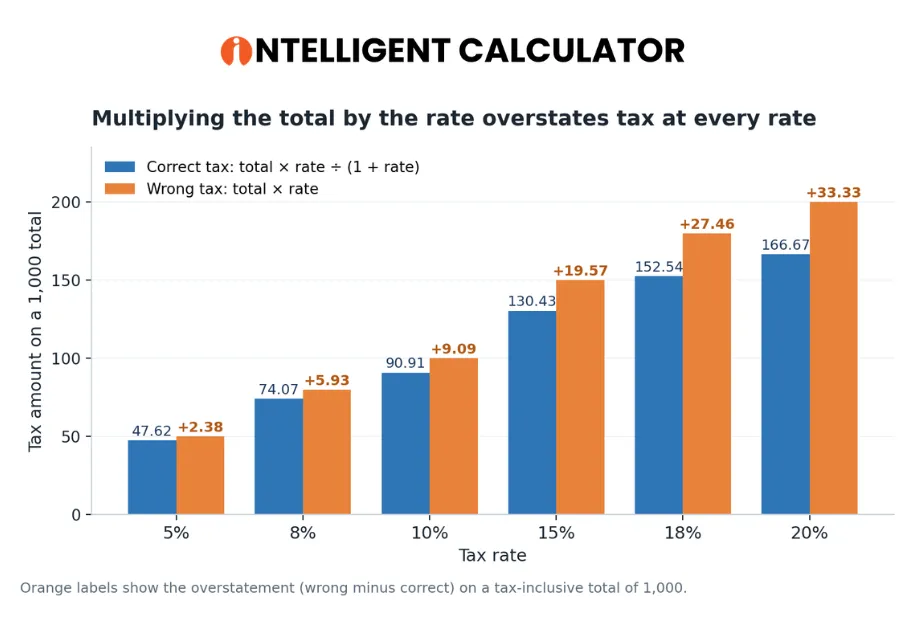
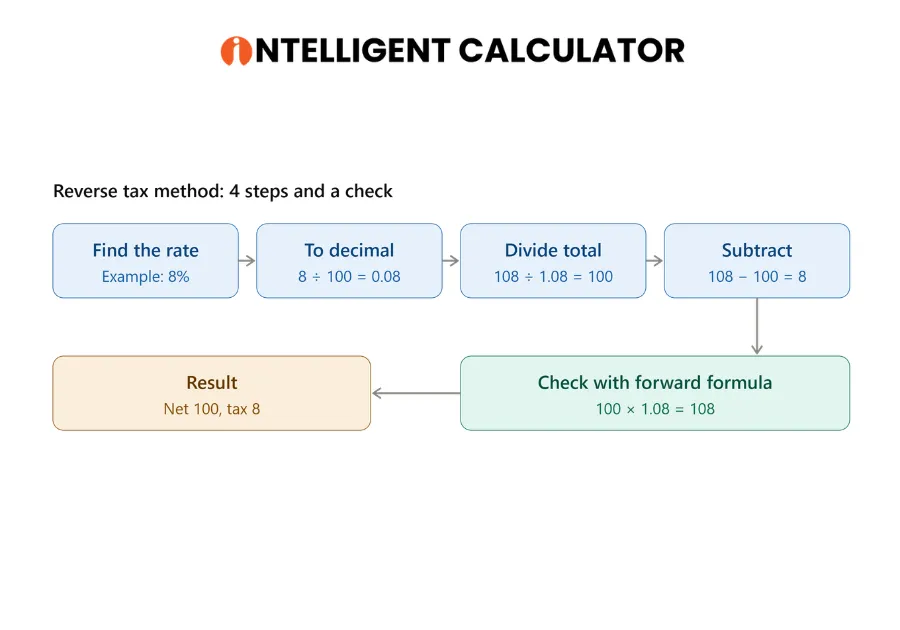
Figure 1 shows the same error on a fixed total of 1,000, with the correct tax in blue and the wrong shortcut in the second series.
Step 1: Find the Correct Tax Rate
The correct tax rate is the rate for your location and product type. Find the rate on your invoice or on your tax authority’s website. Rates change, and food, books, medicine, and services are often taxed differently. The standard rates by country table later in this guide lists the authorities.
Step 2: Convert the Rate to a Decimal
Converting the rate to a decimal means dividing the percentage by 100: 5% = 0.05, 8% = 0.08, 18% = 0.18, 20% = 0.20. Check the conversion with the percentage calculator if you are unsure.
Step 3: Divide the Total by (1 + Rate)
Dividing the total by (1 + rate) gives the pre-tax price. Add 1 to the decimal rate, then divide the total by that number. For an 18% rate, divide by 1.18.
Step 4: Subtract to Find the Tax
Subtracting the net amount from the total gives the tax. The difference is the tax amount.
Pro tip: Calculate the net amount first, round it, and then subtract to get the tax. This order guarantees that the net amount and the tax add up exactly to the total.
Check the result. Run the forward formula on the answer: Net × (1 + rate) must return the original total. If 100 × 1.08 returns 108, the reverse math is right. Every worked example below ends with this check.
Why the Formula Works
The reverse tax formula works because the total equals the net amount plus tax, and tax equals the net amount times the rate. Together these facts give Total = Net × (1 + rate), which is the forward formula that a sales tax calculator applies. To find the net amount, divide both sides by (1 + rate). The result is Net = Total ÷ (1 + rate).
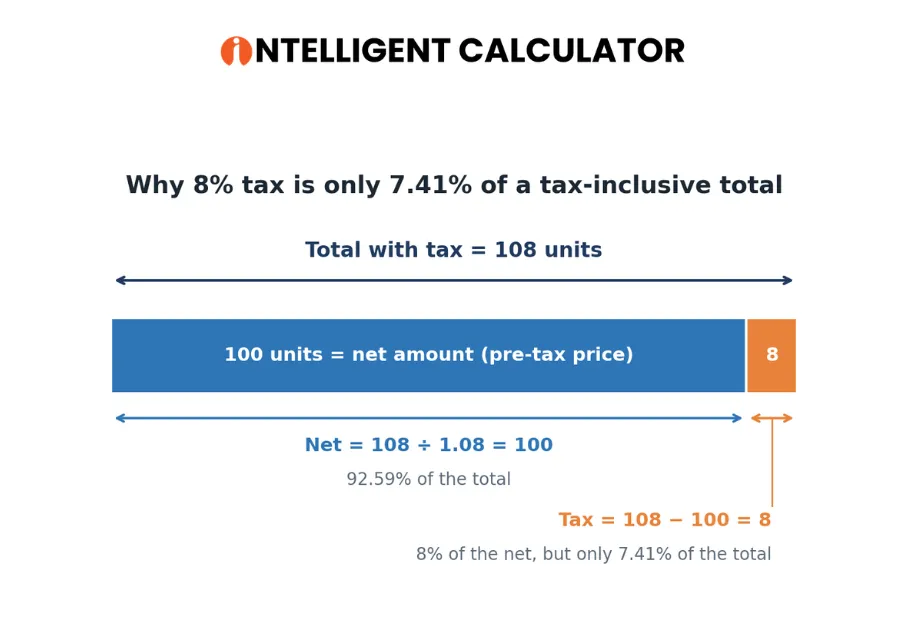
Picture it. Figure 3 shows a bar made of 108 equal units. The first 100 units are the product (net). The last 8 units are the tax. The tax is 8 of 108 units, which is 7.41 percent of the whole bar, even though the tax is 8 percent of the product part.
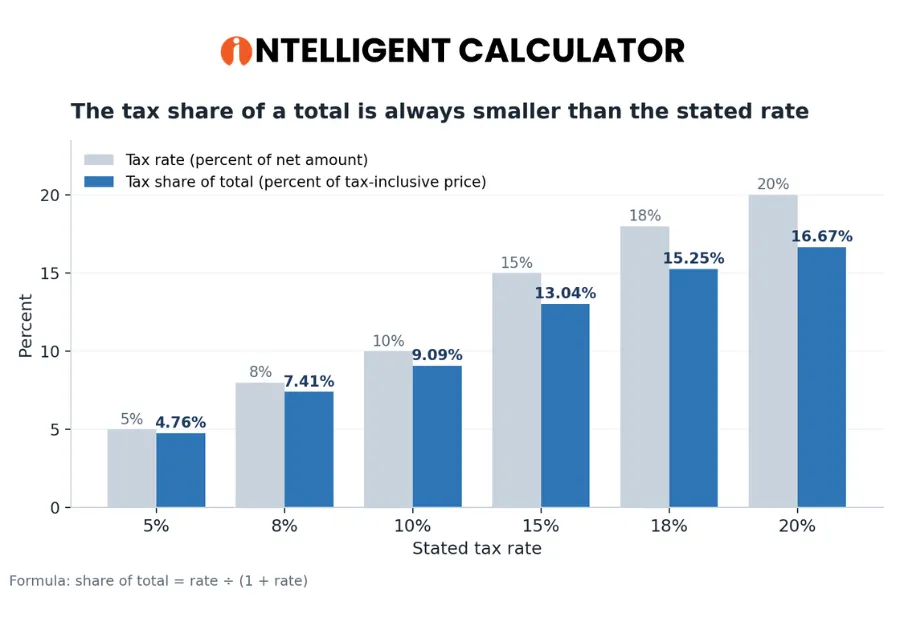
The gap between the stated rate and the share of the total widens as the rate rises.
Tax Fraction Shortcuts: UK 1/6, Australia 1/11, New Zealand 3/23
Tax fraction shortcuts turn the reverse formula into one division. For 10% tax, divide the total by 11. For 20% tax, divide the total by 6, which is the UK VAT fraction. Four fractions cover many countries:
- United Kingdom, 20% VAT: tax = total ÷ 6 (1/6)
- Australia, 10% GST: tax = total ÷ 11 (1/11)
- New Zealand, 15% GST: tax = total × 3 ÷ 23 (3/23)
- Canada, 5% federal GST: tax = total ÷ 21 (1/21)
Quick Reference: Tax Extracted From Common Totals
The quick reference table shows the net amount and the tax inside a 1,000 total at six rates. Table 4 gives the values.
Table 4: Net amount and tax inside a 1,000 total
| Rate | Net amount | Tax amount |
|---|---|---|
| 5% | 952.38 | 47.62 |
| 8% | 925.93 | 74.07 |
| 10% | 909.09 | 90.91 |
| 15% | 869.57 | 130.43 |
| 18% | 847.46 | 152.54 |
| 20% | 833.33 | 166.67 |
On a 1,000 total the tax is 47.62 at 5 percent, 74.07 at 8 percent, 90.91 at 10 percent, 130.43 at 15 percent, 152.54 at 18 percent, and 166.67 at 20 percent. For a total that is not in the table, enter the numbers in the reverse tax calculator for any total. To scale the table values to other totals, use the formula directly for exact cents. The rounding section explains why.
Worked Examples
Nine worked examples show the reverse tax calculation in practice. Examples 1 to 3 cover single-rate cases, Examples 4 to 6 cover real receipts and books, and Examples 7 to 9 cover advanced cases.
Example 1: Retail Receipt With 8% Sales Tax
A shopper paid $250 at a store. The sales tax rate is 8%.
- Net amount: 250 ÷ 1.08 = $231.48
- Tax: 250 − 231.48 = $18.52
Check: 231.48 + 18.52 = 250.00.
Example 2: Freelancer Invoice With 18% GST
A client paid 1,180 for freelance services. GST is 18%.
- Net amount: 1,180 ÷ 1.18 = 1,000
- GST: 1,180 − 1,000 = 180
The freelancer reports 1,000 as income and 180 as tax collected.
Example 3: UK VAT at 20%
A supplier invoice shows £120 including VAT. This is a reverse VAT calculation. Use the VAT calculator to check the result.
- Net amount (the ex-VAT price): 120 ÷ 1.2 = £100
- VAT: 120 − 100 = £20
Dividing £120 by 6 gives the VAT directly, because the UK VAT fraction at 20% is 1/6.
Example 4: A Receipt With Two Tax Rates
A mixed-rate receipt requires one reverse calculation per rate. Suppose a receipt totals 2,350. It includes 1,050 of food taxed at 5% and 1,300 of goods taxed at 18%. Treat each part separately, as Table 5 shows.
Table 5: Mixed-rate receipt split into net amount and tax
| Item group | Total | Rate | Net amount | Tax |
|---|---|---|---|---|
| Food | 1,050 | 5% | 1,000.00 | 50.00 |
| Goods | 1,300 | 18% | 1,101.69 | 198.31 |
| Combined | 2,350 | 2,101.69 | 248.31 |
On the 2,350 receipt, food contains 1,000.00 net and 50.00 tax at 5 percent, goods contain 1,101.69 net and 198.31 tax at 18 percent, and the combined tax is 248.31. Never blend two rates into one average rate. An averaged rate gives the wrong answer.
Example 5: Restaurant Bill With a Tip
A restaurant bill of $115.50 includes tax and a $15 tip. The assumptions are explicit: the 10% tax rate applies only to food and drink, and the $15 tip is not taxed.
- Remove the tip: 115.50 − 15 = $100.50
- Net amount: 100.50 ÷ 1.10 = $91.36
- Tax: 100.50 − 91.36 = $9.14
Check how the restaurant calculates tips, because some restaurants add the tip before tax and some after. A tip calculator helps verify the tip amount.
Example 6: Bookkeeping From a Bank Statement
A bookkeeper in a GST country sees a supplier payment of 472 that includes 18% GST.
- Net amount: 472 ÷ 1.18 = 400
- Tax: 472 − 400 = 72
The bookkeeper records 400 as an expense and 72 as input tax, which a GST-registered business can usually reclaim.
Output tax vs input tax: one bookkeeping entry. Output tax arises on sales and input tax arises on purchases. Table 6 shows one purchase and one sale at 18% GST.
Table 6: Bookkeeping entries for one purchase and one sale at 18% GST
| Transaction | Account | Debit | Credit |
|---|---|---|---|
| Purchase of 472 | Expense | 400 | |
| Purchase of 472 | Input tax (GST receivable) | 72 | |
| Purchase of 472 | Bank | 472 | |
| Sale of 1,180 | Bank | 1,180 | |
| Sale of 1,180 | Sales revenue | 1,000 | |
| Sale of 1,180 | Output tax (GST payable) | 180 |
The purchase records 400 of expense and 72 of input tax, and the sale records 1,000 of revenue and 180 of output tax, so the net GST payable for the period is 180 − 72 = 108. Sales tax in the United States does not work this way, because sales tax has no input tax credit. Record input tax only where the tax system allows it.
Example 7: Compound Tax Example, Two Taxes on the Same Sale
A compound tax reverse calculation divides the total by the product of the tax factors. A total of 1,155 includes two taxes: 10% first, then 5% applied on top of the already-taxed amount. The formula is Total = Net × (1 + r1) × (1 + r2).
- Combined factor: 1.10 × 1.05 = 1.155
- Net amount: 1,155 ÷ 1.155 = 1,000
- First tax: 1,000 × 0.10 = 100
- Second tax: (1,000 + 100) × 0.05 = 55
Check: 1,000 + 100 + 55 = 1,155. If the two taxes were added together instead (15% on the same net), the net would be 1,155 ÷ 1.15 = 1,004.35. Stacked taxes multiply their factors, and additive taxes add their rates.
Example 8: Discount Plus Tax, Finding the Original Price
A discount-plus-tax reverse calculation removes the tax first and the discount second. You paid 86.40 after a 20% discount and 8% tax. This example assumes the discount came before tax. Use the percentage discount calculator to check the discount step.
- Remove the tax: 86.40 ÷ 1.08 = 80.00
- Remove the discount: 80.00 ÷ 0.80 = 100.00
The original price was 100.00 and the tax paid was 6.40.
Example 9: Finding the Tax Rate
Finding the tax rate requires two numbers: the total and the pre-tax price. The total is 108 and the pre-tax price is 100.
- Subtract to get the tax: 108 − 100 = 8
- Divide the tax by the pre-tax price and multiply by 100: 8 ÷ 100 × 100 = 8%
The tax rate is 8%.
Using the Reverse Tax Calculator
A reverse tax calculator, also called a reverse sales tax calculator or a tax-inclusive price calculator, removes the manual steps from the four-step method. The reverse tax calculator on Intel Calculator takes a total and a rate and returns the net amount and the tax amount, which makes a GST backout or a reverse VAT check a one-step task.
Input Fields Explained
A reverse tax calculator uses 4 input fields:
- Total amount: Enter the final price including tax.
- Tax rate (%): Enter the percentage. Enter 18, not 0.18, unless the tool says otherwise.
- Currency: Sets the symbol. Currency does not change the math.
- Rounding: Controls how many decimals the tool shows.
Output Fields Explained
A reverse tax calculator returns 3 outputs:
- Net amount: The price before tax.
- Tax amount: The tax included in the total.
- Total: Your original number, shown to confirm the split.
A reliable calculator also shows the tax share of the total, a verification line (net + tax = original total), a plain-language result sentence, and a prompt such as “Did you mean 18%?” when a rate is typed as 0.18. Use these features as a checklist when you compare tools.
Assumptions and Limitations
A reverse tax calculator assumes one flat rate for the whole total. The calculator also assumes the total contains tax and nothing else, such as tips or shipping. A calculator cannot handle mixed rates, partial exemptions, or stacked taxes unless you split the amounts yourself. Always check the result against your invoice.
Which Calculator Should You Use?
Each tax tool answers a different question. Match the tool to the starting number:
- Total with tax, need the pre-tax price: use the reverse tax calculator.
- Pre-tax price, need the total with tax: use the sales tax calculator.
- UK or EU invoice with VAT-inclusive totals: use the free VAT calculator.
- Cost and selling price, need profit percentages: use the margin and markup calculator.
Special Cases and Edge Cases
Special cases change the reverse tax calculation because they change what part of the total carries tax. This section covers 10 cases and ends with a list of situations where the simple method does not apply.
Items That Are Tax-Exempt or Zero-Rated
Exempt goods are outside the tax, and zero-rated goods are taxed at 0%. Sellers of zero-rated goods can still reclaim the tax they paid on costs. If an item is exempt, the net amount equals the total, so do not run the reverse formula on the item.
Shipping and Service Charges
Shipping may or may not be taxable. Some places tax shipping at the same rate as the goods, and other places do not tax shipping at all. Check your tax authority’s rules, separate taxed and untaxed amounts, and then divide only the taxed amount.
Marketplaces and Platform Fees
A tax-inclusive marketplace sale splits into the seller’s net revenue and the tax. A sale of 118 at 18% gives the seller 100 net and 18 tax. Platform fees may be calculated on the gross amount or the net amount, so read the platform’s own terms before you compute margin.
Tips and Service Charges
A tip is usually outside the taxable base when the customer chooses it freely. Subtract the tip first, then apply the reverse formula to the remaining amount, as Example 5 shows. You can calculate the tip amount separately before you subtract it. A mandatory service charge may be taxable in some places, so check the local rule.
Discounts
A discount applied before tax lowers the taxable base. A discount applied after tax leaves the taxable base at the full price. The invoice should show which order was used. Example 8 shows a discount applied before tax, and a discount percentage calculator confirms the discount step.
Layered or Compound Taxes
Layered taxes are two or more taxes charged on the same sale, such as state plus local sales tax or a federal tax plus a provincial tax. If the taxes are added together and applied to the same net amount, add the rates first: for 6% plus 2%, use 8%. If one tax is applied on top of another, multiply the factors, as Example 7 shows. If you are unsure which applies, check with an accountant.
Prices Quoted Including Tax by Law
In many countries, consumer prices must include tax. In the European Union, the Price Indication Directive 98/6/EC requires the selling price shown to consumers to include VAT and other taxes, and the United Kingdom has similar price-marking rules. In the United States, shelf prices usually exclude sales tax, and the tax is added at checkout. State departments of revenue publish the US rates.
Prices include tax in many VAT and GST countries so that the sticker price matches the checkout price, while United States sales tax varies by state and locality and is added at the register. This difference is why reverse calculations come up so often outside the United States.
Which Rate Applies When the Rate Changed?
A rate change creates two tax rates on invoices around the change date. India’s GST reforms took effect on September 22, 2025, after the GST Council’s 56th meeting on September 3, 2025. The reform left slabs of 5%, 18%, and 40% (plus 0% for exempt and nil-rated items) and removed the old 12% and 28% slabs. For supplies made around a rate-change date, do not rely on the invoice date alone. Check the tax authority’s time-of-supply rules.
Reverse Tax Calculation vs Reverse Charge
A reverse tax calculation splits a tax-inclusive total into net and tax. Reverse charge is a separate VAT rule in which the buyer, not the seller, accounts for the tax. The two terms sound alike, but they describe different concepts, and reverse charge is not the same as removing tax from a total.
When This Method Does Not Apply
The simple reverse formula does not apply directly in 5 situations:
- Exempt items, where the net amount equals the total.
- Tips and other untaxed charges inside the total, which must be removed first.
- Compound taxes, which need the product of the tax factors.
- Mixed-rate receipts, which need one calculation per rate.
- Totals where the rate is unknown and no pre-tax price is available.
Standard Tax Rates by Country (Verify Before Use)
Standard consumer tax rates differ by country, and each rate has a named authority that publishes it. Rates change, so confirm the current rate with the authority listed before you rely on it. Table 7 lists eight jurisdictions.
Table 7: Standard consumer tax rates, tax fractions, and authorities
| Country | Tax name | Standard rate | Tax fraction of total | Authority and source |
|---|---|---|---|---|
| United Kingdom | VAT | 20% | 1/6 (16.67%) | HMRC, GOV.UK VAT rates; Value Added Tax Act 1994 |
| India | GST | 18% standard; slabs 5%, 18%, 40% since Sept 22, 2025 | 15.25% at 18% | GST Council (56th meeting, Sept 3, 2025); CBIC notifications |
| Pakistan | Sales tax (federal on goods, provincial on services) | 18% on most goods; provinces set service rates (commonly 13% to 16%) | 15.25% at 18% | Federal Board of Revenue, Sales Tax Act 1990; provincial revenue authorities |
| Canada | GST and HST | 5% federal GST; HST varies by province | 1/21 (4.76%) at 5% | Canada Revenue Agency; Excise Tax Act |
| Australia | GST | 10% | 1/11 (9.09%) | Australian Taxation Office; GST Act 1999 |
| New Zealand | GST | 15% | 3/23 (13.04%) | Inland Revenue; Goods and Services Tax Act 1985 |
| European Union | VAT | Set by each member state (EU minimum standard rate 15%) | Varies by state | National tax authorities; VAT Directive 2006/112/EC |
| United States | State and local sales tax | No federal sales tax; varies by state and locality | Rate ÷ (1 + rate) | State departments of revenue |
The standard rate is 20% in the United Kingdom, 18% in India and for most goods in Pakistan, 5% federal GST in Canada, 10% in Australia, and 15% in New Zealand, while the United States has no federal sales tax and each EU country sets its own VAT rate.
Pakistan needs extra care. The federal government taxes goods through the Federal Board of Revenue, and the provinces tax services through their own revenue authorities, so a service invoice may use a different rate than a goods invoice. Confirm provincial service rates with the provincial authority. For United States totals, apply your state and local rate in the sales tax calculator for US totals when you need the forward direction.
Use this 3-step routine to verify any rate:
- Open the tax authority’s rate page from the table above.
- Check the effective date of the rate.
- Record the date you reviewed the rate next to the rate in your rate table.
Calculate Tax From a Total at Common Rates
Each common rate has a fixed divisor and a fixed tax fraction. The six rates below answer the most frequent searches, and the reverse tax calculator with any rate confirms each result.
How to Calculate 18% GST From a Total Amount
Divide the total by 1.18 to get the net amount. A total of 2,360 gives a net amount of 2,000 and GST of 360. The GST also equals the total × 0.152542.
How to Calculate 20% VAT From a Total Price
Divide the total price by 1.2, or divide the VAT-inclusive price by 6 for the VAT. A total of 240 gives an ex-VAT price of 200 and VAT of 40.
How to Remove 8% Sales Tax From a Total
Divide the total by 1.08. A total of 540 gives a pre-tax price of 500 and sales tax of 40.
How to Calculate 10% Tax From a Total
Divide the total by 11 to get the tax. A total of 330 gives tax of 30 and a net amount of 300.
How to Calculate 15% GST From a Total
Divide the total by 1.15, or multiply the total by 3 and divide by 23 for the GST. A total of 460 gives GST of 60 and a net amount of 400.
How to Calculate 5% Tax From a Total
Divide the total by 1.05, or divide the total by 21 for the tax. A total of 210 gives tax of 10 and a net amount of 200.
Forward vs. Reverse Tax Calculation
Forward and reverse tax calculations are inverse operations. A reverse sales tax calculation undoes a forward one, and knowing both directions helps you spot errors. Use the sales tax calculator for the forward direction, and use Table 8 to compare the two methods.
Table 8: Forward and reverse tax calculation compared
| Feature | Forward calculation | Reverse calculation |
|---|---|---|
| Starting point | Pre-tax price | Total with tax |
| Goal | Find tax and total | Find tax and pre-tax price |
| Tax formula | Net × rate | Total × rate ÷ (1 + rate) |
| Total or net formula | Net × (1 + rate) | Total ÷ (1 + rate) |
| Common use | Pricing, quotes | Receipts, invoices, bookkeeping |
Forward calculation starts from the pre-tax price and multiplies by (1 + rate); reverse calculation starts from the total and divides by (1 + rate). Forward example: $100 × 1.08 = $108. Reverse example: $108 ÷ 1.08 = $100. Run the forward formula on your answer, and if the forward formula returns the original total, your math is right.
How to Do It in Excel, Google Sheets, and Code
The reverse tax formula runs in Excel and Google Sheets with two cell formulas, which lets you back-calculate tax for a whole ledger. Put the total in cell A2 and the rate as a decimal (0.18) in B2.
- Net amount, in C2:
=A2/(1+B2) - Rounded net amount, in C2:
=ROUND(A2/(1+B2),2) - Tax amount, in D2:
=A2-C2
Put the net formula in C2 and the tax formula in D2, so that D2 can subtract C2 from A2. If the rate is stored as 18 instead of 0.18, use =A2/(1+B2/100). Format the cells as currency. To remove tax from a whole column of invoices, select C2:D2 and drag the formulas down the column.
Reverse Tax Formula in Code
The same formula runs in any programming language. Python with the Decimal type avoids floating-point surprises:
from decimal import Decimal, ROUND_HALF_UP

def reverse_tax(total, rate_percent):
    total = Decimal(str(total))
    rate = Decimal(str(rate_percent)) / 100
    net = (total / (1 + rate)).quantize(Decimal("0.01"), ROUND_HALF_UP)
    tax = total - net
    return net, tax

print(reverse_tax(108, 8))  # (Decimal('100.00'), Decimal('8.00'))
JavaScript uses rounding to two decimals:
function reverseTax(total, ratePercent) {
  const net = Math.round((total / (1 + ratePercent / 100)) * 100) / 100;
  const tax = Math.round((total - net) * 100) / 100;
  return { net, tax };
}

console.log(reverseTax(108, 8)); // { net: 100, tax: 8 }
Both snippets calculate the net amount first and subtract to get the tax, which follows the pro tip in the step-by-step method.
Rounding: Why Pennies Sometimes Do Not Match
Rounding causes most one-cent differences between a reverse tax calculation and an invoice. Reverse math often produces long decimals. For example, 250 ÷ 1.08 equals 231.48148… Round the net amount to two decimals, then subtract to get the tax so the pieces add up to the total.
Rounding the net first matters when you scale a result. For a 5,000 total at 18%, 5,000 ÷ 1.18 = 4,237.288…, which rounds to 4,237.29, so the tax is 762.71. Multiplying the rounded 152.54 from the quick reference by 5 gives 762.70, one cent off. Scaling a rounded figure compounds the rounding error, so use the formula directly for exact cents.
Businesses sometimes round each line item and sometimes round the invoice total. Rules vary by country and tax authority. Table 9 shows a case study: an invoice with three lines of 5.00, 5.00, and 11.00 (total 21.00) at 8% tax.
Table 9: Line-level rounding compared with invoice-level rounding
| Method | Net amount | Tax amount |
|---|---|---|
| Round each line (4.63 + 4.63 + 10.19) | 19.45 | 1.55 |
| Round the invoice total (21.00 ÷ 1.08) | 19.44 | 1.56 |
Line-level rounding gives 19.45 net and 1.55 tax, while invoice-level rounding gives 19.44 net and 1.56 tax, a one-cent gap on the same 21.00 invoice. When your numbers differ from a supplier invoice by a cent, check the rounding method first, follow the rule of your tax authority or accounting system, and keep documentation of the method.
Common Mistakes to Avoid
Ten mistakes cause most errors in reverse tax calculations:
- Multiplying the total by the rate. This overstates the tax.
- Subtracting the rate as a percentage of the total. Taking 8% off $108 gives $99.36, not $100.
- Using the wrong rate. Check whether the item is standard-rated, reduced-rated, or exempt.
- Forgetting tips, shipping, or fees. Remove anything not taxed before you calculate.
- Mixing rates. Split mixed receipts into separate parts, and never average two rates.
- Adding stacked taxes. Multiply their factors instead.
- Entering 0.18 as a percentage. Some tools expect 18, not 0.18.
- Applying a new rate to old supplies. Check the change date and the time of supply.
- Scaling a rounded figure. Use the formula directly for exact cents.
- Treating the tax part as revenue. Revenue is the net amount, and the tax is a liability.
Warning: This guide explains arithmetic. This guide is not tax advice. For filings, registration, or disputes, consult your tax authority or a qualified accountant.
Reverse Tax Calculation vs. Markup and Margin
Reverse tax calculation, markup, and margin use similar division and percentage math but measure different things. Use the margin and markup calculator for pricing, and use Table 10 to compare the three concepts.
Table 10: Tax from total compared with markup and margin
| Concept | What it measures | Formula |
|---|---|---|
| Tax from total | Tax inside a final price | Total × rate ÷ (1 + rate) |
| Markup | Added percent over cost | Cost × (1 + markup) |
| Margin | Profit as a share of price | (Price − Cost) ÷ Price |
Tax from a total equals total times rate divided by (1 + rate), markup equals cost times (1 + markup), and margin equals (price − cost) divided by price. The same logic applies to markup: if a price includes a 25% markup, cost equals price ÷ 1.25, not price minus 25%. A cost of 60 and a price of 100 give a markup of 66.67% and a margin of 40%. For the growth math behind markup, see the percentage increase calculator.
Expert Insight: Why Businesses Prefer Tax-Inclusive Pricing
Tax-inclusive pricing is simpler for customers because the sticker price matches the checkout price. The trade-off is more work in bookkeeping. Businesses must back out the tax on every sale to report accurate revenue. Accounting software does this automatically, but you still need the math to catch errors.
Best practices for small businesses:
- Keep a rate table for each product category, and review the table whenever your tax authority announces changes.
- Record the net amount as revenue and the tax as a liability (output tax), never as income.
- On purchases, record input tax separately where your system allows a credit.
- Reconcile sales totals against tax filings every month.
- Re-price and update your accounting software on the day a rate changes, and test the new tax-inclusive prices in the sales tax calculator.
A five-step monthly reconciliation routine:
- Export the month’s sales and purchase totals.
- Split each gross total into net and tax with the reverse formula.
- Tie the tax totals to the tax filing.
- Review differences, starting with rounding and mixed rates.
- Document the rounding method used.
A rate-change checklist: update the rate table, re-price products, update the accounting software, and review invoices raised during the transition.
Risk analysis. Reporting too little tax can lead to penalties and interest under the rules of the tax authority. Reporting too much tax can mean paying more than is owed until the figure is corrected. Remedies and time limits vary by country, so check the authority’s guidance before you amend a filing.
Frequently Asked Questions
How do I calculate tax from a total amount?
Divide the total by 1 plus the tax rate written as a decimal. The result is the net (pre-tax) amount. Subtract the net amount from the total to get the tax. For a 108 total at 8 percent tax, 108 ÷ 1.08 = 100 net and 8 tax.
How do I find the pre-tax price from a total with tax?
Use Net = Total ÷ (1 + rate). For a $108 total at 8% tax, divide 108 by 1.08, so the pre-tax price is $100.
What is the formula to remove sales tax from a total?
Divide the total by (1 + the sales tax rate). For 7% sales tax, divide the total by 1.07. The answer is the price before tax.
How do I find tax from the total price?
Divide the total price by (1 + the tax rate) to get the pre-tax price, then subtract the pre-tax price from the total price. The difference is the tax. For a total price of 540 at 8%, the pre-tax price is 500 and the tax is 40.
How do I take tax out of a total on a receipt?
Find the tax rate that applies to the items on the receipt, then divide the receipt total by (1 + rate) to get the pre-tax amount. Subtract the pre-tax amount from the total to get the tax. If the receipt mixes rates or includes a tip, split those amounts first.
How do I calculate tax backwards from the final price?
Calculating tax backwards means using the reverse formula: divide the final price by (1 + rate), then subtract the result from the final price. For a final price of 250 at 8%, the pre-tax price is 231.48 and the tax is 18.52.
How do I calculate VAT from a gross amount?
Use VAT = Gross × rate ÷ (1 + rate). At 20% VAT, the VAT is one sixth of the gross amount, so a £120 gross amount contains £20 of VAT. A VAT calculator for gross amounts gives the same split.
What is the VAT fraction?
The VAT fraction is the share of a VAT-inclusive price that is VAT: rate ÷ (1 + rate). At the UK standard rate of 20%, the VAT fraction is 1/6, about 16.67% of the gross amount.
How do I calculate GST from a total amount?
GST works like VAT. For 18% GST, divide the total by 1.18 to get the net amount, then subtract the net amount from the total to get the GST. A total of 1,180 contains 180 of GST.
How do I calculate 15 percent GST from a total amount?
Divide the total by 1.15 to get the net amount, then subtract to get the GST. The GST also equals the total × 3 ÷ 23. A total of 460 contains 60 of GST and has a net amount of 400.
Why is the tax not simply the rate times the total?
Tax is charged on the net amount, not on the total, and the total already contains the tax. Multiplying the total by the rate therefore overstates the tax. At 8% on a 108 total, the shortcut gives 8.64 instead of the correct 8.00.
How do I calculate 10% tax from a total?
Divide the total by 11 to get the tax amount. For a $110 total, the tax is $10 and the pre-tax price is $100.
How do I calculate tax if I only know the percentage and the total?
Convert the percentage to a decimal and use Tax = Total × rate ÷ (1 + rate). For a 250 total at 8%, tax = 250 × 0.08 ÷ 1.08 = 18.52.
How do I find the tax rate from a total and a pre-tax price?
Subtract the pre-tax price from the total to get the tax, divide the tax by the pre-tax price, and multiply by 100. For a total of 108 and a pre-tax price of 100, the tax is 8, so the rate is 8%.
Can I calculate tax from a total if I do not know the tax rate?
Not from the total alone. You need either the rate, or both the total and the pre-tax price. With both numbers, subtract to find the tax and divide the tax by the pre-tax price to find the rate.
How do I handle a total with different tax rates?
Split the total by item group, run the reverse formula on each group with its own rate, then add the net amounts and the tax amounts. Never average the rates. The same method splits a receipt with two tax rates.
How do I get the original price when a discount and tax were both applied?
Divide the final price by (1 + tax rate) to remove the tax, then divide by (1 − discount rate) to remove the discount, assuming the discount came before tax. A final price of 86.40 after a 20% discount and 8% tax gives 86.40 ÷ 1.08 = 80.00, then 80.00 ÷ 0.80 = 100.00. The percentage discount calculator checks the discount step.
How do I calculate tax on a receipt that has no tax breakdown?
You need the tax rate, because the receipt total alone does not reveal it. Look up the rate for the store’s location and the product type, then divide the total by (1 + rate). If the receipt mixes taxable and exempt items, ask the seller for an itemized receipt.
Does a tip change the reverse tax calculation?
Yes, when the tip is included in the total but is not taxed. Subtract the tip first (a tip calculator helps), then divide the remaining amount by (1 + rate). Whether the tip counts before or after tax depends on how the restaurant calculates the bill, so check the receipt.
Can shipping be taxed at a different rate than goods?
Yes, in some tax systems. Some places tax shipping at the same rate as the goods, some tax shipping at a different rate, and some do not tax shipping at all. Check the tax authority’s rule and separate the shipping amount before you divide.
How do I calculate tax from a total in Excel or Google Sheets?
Put the total in A2 and the decimal rate in B2. Enter =ROUND(A2/(1+B2),2) in C2 for the net amount and =A2-C2 in D2 for the tax, then drag both formulas down the column.
How do I remove tax from a whole column of invoices in Excel?
Put the invoice totals in column A and the decimal rate in column B. Enter =ROUND(A2/(1+B2),2) in C2 and =A2-C2 in D2, then select C2:D2 and drag the fill handle down to the last invoice. Each row then shows its own net amount and tax.
Does the reverse tax formula work for every country?
The formula works wherever tax is a single percentage applied to the net price. Rounding rules, exemptions, mixed rates, and stacked taxes differ by country, so check your local tax authority.
What is the current standard GST rate in India and sales tax rate in Pakistan?
India’s standard GST rate is 18%, and the slabs have been 5%, 18%, and 40% since September 22, 2025. Pakistan’s federal sales tax on goods is 18% for most goods, while the provinces tax services at their own rates, commonly 13% to 16%. Confirm current rates with the GST Council or CBIC in India and with the Federal Board of Revenue or the provincial authority in Pakistan.
What is the difference between reverse tax calculation and reverse charge?
A reverse tax calculation splits a tax-inclusive total into net and tax. Reverse charge is a VAT rule in which the buyer, not the seller, accounts for the tax. They are different concepts.
Is a tax-inclusive price the same as a gross price?
In most invoice contexts, yes. A tax-inclusive price is a gross price, which means the amount including tax. The matching net price is the amount excluding tax.
How accurate is a reverse tax calculator?
A reverse tax calculator, such as the free reverse tax calculator on Intel Calculator, is accurate when the total and the rate are correct and the whole total is taxed at one rate. The calculator cannot detect exempt items, mixed rates, tips, or shipping, so verify the result against your invoice.
Is my receipt tax correct?
Run the reverse formula with the stated rate and compare the result with the tax line on the receipt. If the two numbers differ by one cent, rounding is the likely cause. If the numbers differ by more, check for mixed rates, exempt items, or a wrong rate.
Why is my calculated tax one cent different from the invoice?
The usual cause is rounding. Some businesses round each line and others round the invoice total. Compare the rounding method on the invoice before assuming an error.
What does ex-VAT or ex-GST mean?
Ex-VAT or ex-GST means excluding tax. An ex-VAT price is the net price, before value-added tax or goods and services tax is added.
Sources
This guide relies on 8 named sources for rates, laws, and rate-change dates:
- HM Revenue and Customs (HMRC), GOV.UK: VAT rates and Value Added Tax Act 1994 (United Kingdom).
- GST Council, 56th meeting (September 3, 2025), and Central Board of Indirect Taxes and Customs (CBIC) rate notifications effective September 22, 2025 (India).
- Federal Board of Revenue (FBR), Sales Tax Act 1990, and provincial revenue authorities for services (Pakistan).
- Canada Revenue Agency, Excise Tax Act (GST and HST).
- Australian Taxation Office, A New Tax System (Goods and Services Tax) Act 1999.
- Inland Revenue (New Zealand), Goods and Services Tax Act 1985.
- European Union VAT Directive 2006/112/EC and Price Indication Directive 98/6/EC.
- State departments of revenue (United States).
Rates and rules were reviewed in October 2026. Rates change, so confirm the rate with the authority above before you file or invoice.
Conclusion
To calculate tax from a total amount, divide the total by (1 + the tax rate) and subtract the result from the total to get the tax. Do not multiply the total by the rate, because that shortcut always overstates the tax.
Use the multiplier table for fast answers, split mixed-rate receipts, multiply the factors of stacked taxes, and round only the net amount before subtracting. A free online reverse tax calculator saves time when you extract VAT or GST from a gross amount, but understanding the math helps you catch errors in receipts, invoices, and books. Last updated October 2026.








 to find the pre-tax price. Learn the reverse formula, worked examples, and common mistakes, then use our free calculator.)